
The Best AI Tools Every Developer Should Be Using in 2026
The landscape of software development has undergone a fundamental transformation. AI-powered tools have evolved from experimental assistants to essential productivity multipliers that skilled developers leverage daily. In 2026, the question is no longer whether to adopt AI tools; it is which ones deliver genuine value and how to integrate them into professional workflows without losing engineering discipline.


By Luis Chacon, Marielis Ontiveros
Our guide on how AI is reshaping the software development lifecycle covers the macro transformation. This article is the tactical complement: the specific tools driving those gains, evaluated from real-world usage across our client engagements.
A quick-reference comparison before we go deep:
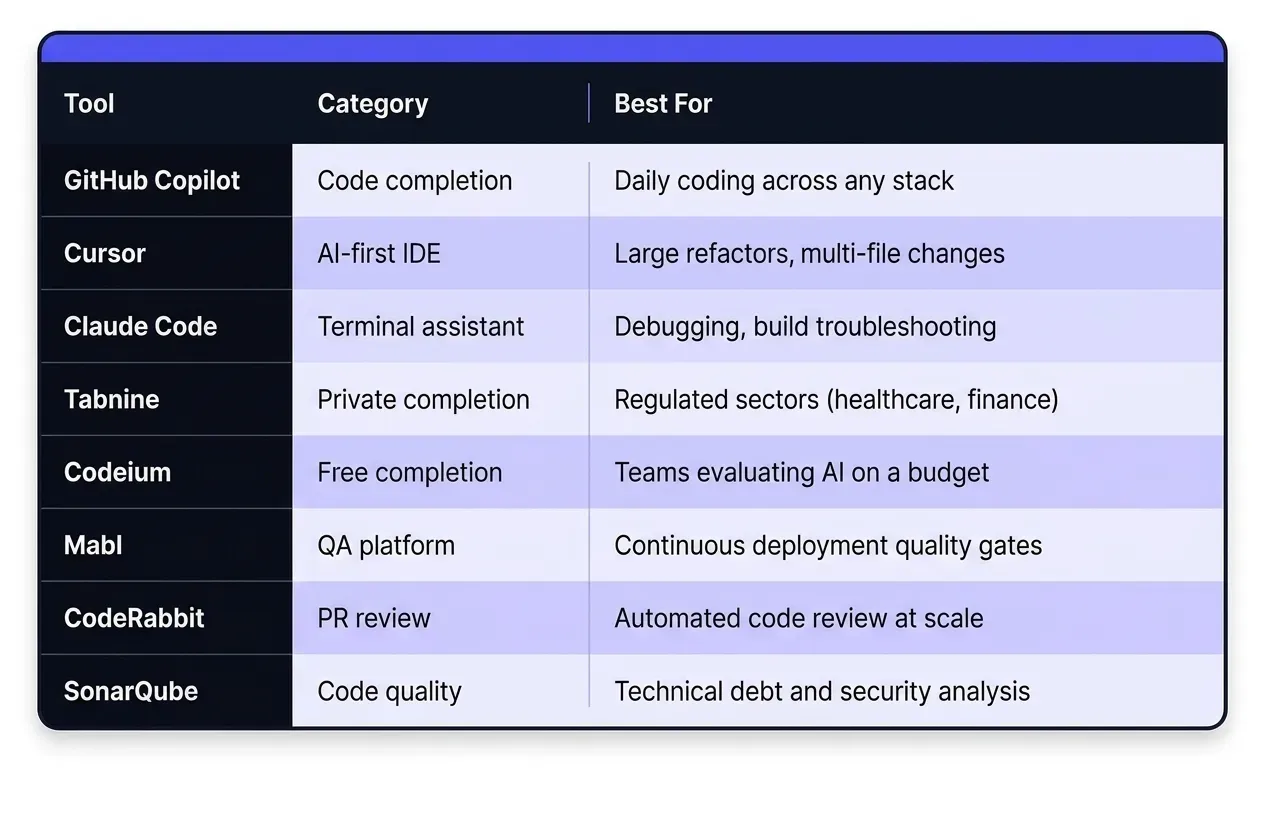
Why AI-Powered Development Tools Matter in 2026
GitHub's research on AI-assisted development documents productivity gains of 35% to 55% for developers using AI coding assistants, not because AI writes entire applications autonomously, but because it eliminates friction on routine tasks and lets engineers focus on high-value architectural work.
The competitive advantage extends beyond individual output. Organizations that effectively integrate AI-powered tools ship features faster, maintain higher code quality through AI-assisted review, reduce technical debt through better documentation, and attract developers who expect modern tooling as a baseline.
The caveat that matters: tools amplify existing engineering culture. Teams that adopt AI carelessly accumulate liability faster. Teams that adopt it with discipline, as we describe in our structured AI development workflow, compound the gains over time.
Essential AI Coding Assistants
GitHub Copilot: The Pioneer
GitHub Copilot remains the most widely adopted AI coding assistant, with over 1.8 million paying subscribers as of early 2026. Built on OpenAI's Codex model and deeply integrated into VS Code and other popular IDEs, Copilot excels at inline code completion, function generation from comments, and suggesting entire blocks based on file context.
Strengths include exceptional context awareness within files, strong multi-language support across Python, JavaScript, TypeScript, Go, Ruby, and Java, and a chat interface for code explanation, refactoring, and test generation. Best use cases: boilerplate generation, test writing, documentation, and rapid prototyping. The productivity gains are highest when Copilot handles the mechanical work and the engineer handles the judgment calls.
Cursor: The AI-First IDE
Cursor takes a fundamentally different approach, it builds an entire IDE around AI assistance rather than adding it onto an existing editor. Based on VS Code but redesigned for AI-native development, Cursor offers codebase-aware assistance that understands the entire project, natural language editing where developers describe changes in plain English, and multi-file refactoring that maintains consistency across large codebases.
Cursor is the right tool when the task spans multiple files, large refactoring initiatives, architectural changes, or navigating an unfamiliar codebase where understanding component relationships matters more than line-by-line completion.
Claude Code: Terminal-First Development
Claude Code, developed by Anthropic, brings AI assistance directly into the terminal. Unlike IDE-based tools, it operates as a CLI that engineers invoke without context switching out of their natural environment. Its distinctive strength is agentic workflows, executing multiple steps to accomplish a goal, with full file system navigation, version control integration, and the ability to run tests, analyze output, and suggest fixes based on actual error messages.
Claude Code excels at debugging sessions and build process troubleshooting. Our case study on building HIPAA-compliant MFA for a telehealth platform in four days, including a complete architectural pivot mid-project, illustrates exactly where terminal-first AI assistance creates the most leverage under production pressure.
Specialized AI Development Tools
Tabnine: Privacy-First Code Completion
Tabnine addresses a constraint that Copilot and Cursor do not: data privacy. Tabnine supports fully on-premises or private cloud deployment, meaning code never leaves the organization's infrastructure. For teams operating under OWASP security standards and sector-specific regulations in healthcare, finance, and government, this is not a preference, it is a requirement. The tool also supports team-specific model training, allowing organizations to build completion models optimized for their particular codebases and conventions.
Codeium: Free Alternative with Enterprise Options
Codeium provides free AI-powered code completion for individual developers with enterprise-grade features available for teams. Support for 70+ programming languages, integration with 40+ IDEs, and enterprise controls including admin dashboards and usage analytics make it the lowest-friction entry point for teams evaluating AI assistance before committing to a paid subscription.
Replit Ghostwriter: Cloud-Native Development
Replit Ghostwriter integrates AI assistance directly into Replit's cloud-based development environment. For teams working in cloud IDEs or prioritizing consistent environments across distributed teams, Ghostwriter provides completion, debugging, and chat assistance in a unified platform, without local environment configuration overhead.
AI Tools for Testing and Quality Assurance
Testing is one of the highest-leverage areas for AI adoption and one of the most underutilized. Our detailed guide on AI in QA testing covers the cultural and process dimensions. Here are the tools that make it operational.
Testim: AI-Powered Test Automation
Testim addresses the maintenance burden that makes traditional test automation expensive at scale. Its self-healing tests automatically adapt when UI elements change, eliminating the brittle locator failures that consume QA engineer time in long-lived applications. Visual test creation through user interaction recording requires no scripting expertise, and CI/CD pipeline integration enables automated execution on every push.
Mabl: Intelligent Test Automation Platform
Mabl combines AI-powered test creation with quality insights at the platform level. It automatically generates tests from user flows, identifies regressions across deployments, and produces detailed reports connecting test results to business outcomes. Particularly valuable for teams where dedicated QA automation engineers are scarce, Mabl lowers the barrier to comprehensive automated coverage without deep scripting knowledge, aligning with the risk-driven QA approach we apply across our client engagements.
AI-Enhanced Code Review and Analysis
CodeRabbit: Automated PR Reviews
CodeRabbit analyzes pull requests and delivers structured reviews, code quality suggestions, potential bugs, security vulnerabilities, and best practice recommendations, integrated directly into GitHub, GitLab, and Bitbucket workflows. As Atlassian's research on code review consistently shows, superficial reviews miss the issues that matter most. CodeRabbit handles the mechanical layer so senior engineers can direct review attention to architecture and business logic. For junior developers, the inline feedback functions as continuous education across every PR.
SonarQube: Quality Gate Automation
SonarQube remains the standard for continuous code quality analysis at scale. Its recent AI enhancements add intelligent remediation suggestions, so developers receive a concrete fix path, not just a violation notice. Its value is in combining technical debt quantification, security hotspot identification, and quality gate automation in DevOps pipelines into a single enforced workflow.
Documentation and Knowledge Management
Mintlify: AI Documentation Generation
Mintlify analyzes functions, classes, and modules to generate comprehensive documentation, parameter descriptions, return values, usage examples, and integration guides, that stays current because it is generated from the code itself, not maintained separately. For API development teams, it eliminates the gap between a shipped endpoint and its documented specification.
GitBook: Team Knowledge Bases
GitBook's AI features help growing teams build and maintain institutional knowledge at scale, suggesting relevant documentation based on code commits, answering developer questions from existing docs, and surfacing gaps before they become onboarding friction. As teams scale through internal growth or nearshore staff augmentation, knowledge management becomes a meaningful bottleneck. GitBook with AI makes it scalable.
How Sancrisoft Leverages These Tools
Our Multi-Tool Strategy
We do not standardize on a single AI tool. Different contexts demand different tools, and the investment in training across multiple tools pays back in outcomes. Cursor becomes the tool of choice for large refactoring initiatives. Claude Code handles debugging and build troubleshooting where terminal integration provides direct value.
Our 11-month engagement with Venice.ai, building a privacy-first AI platform from mobile to backend, ran on this multi-tool approach. The right tool for the right task, with human review at every step. As we document in our AI development principles: AI proposes. Engineers approve.
AI-Enhanced Testing and QA
Our quality assurance practice leverages AI-powered testing tools to maintain high standards while accelerating delivery. Automated test generation surfaces edge cases human testers miss. Self-healing tests reduce maintenance overhead as applications evolve. The result is faster release cycles without the quality trade-offs that traditional approaches require teams to accept.
Best Practices for AI Tool Adoption
Start with High-Impact, Low-Risk Use Cases
Begin with scenarios where AI delivers clear value without significant risk, test writing, documentation generation, and boilerplate code creation. These tasks are time-consuming, straightforward to validate, and low-risk if suggestions need modification. Success here builds the confidence and habits that make higher-stakes AI adoption reliable.
Invest in Team Training and Set Clear Policies
AI tools amplify developer capability, they do not replace skill and judgment. Teams need training on effective prompting, critical evaluation of AI suggestions, and understanding tool failure modes. Equally important: establish clear policies about what code can be processed by external AI services, implement scanning to catch inadvertent inclusion of secrets, and for regulated environments, follow noopener noreferrer in your tool selection. Tabnine's on-premises option exists precisely for this scenario.
Measure and Optimize
Track what matters, velocity in features shipped, code quality from static analysis, developer satisfaction, and time allocation across development activities. Use data to guide which tools to emphasize, expand, or replace. The teams that get the most from AI tooling are the ones that treat adoption as an ongoing engineering practice, not a one-time implementation.
Ready to Build with an AI-Native Team?
Knowing which tools exist is one thing. Knowing how to integrate them into a production development workflow, with the human checkpoints, code review discipline, and quality standards that real clients require, is another.
At Sancrisoft, our engineers in Medellín use these tools daily across web, mobile, healthcare, and cloud engagements, operating in your timezone with full visibility into every decision. We move fast. We review everything. And we can explain the architectural rationale behind any line of code in the codebase.
Whether you need to augment your team with senior engineers who already have AI-tool mastery, build a dedicated nearshore development team for a critical product initiative, or simply talk through which of these tools fits your specific technical context, we are the right conversation to have.
Schedule a consultation with our team. No pitch, just an honest technical discussion about what your engineering workflow needs and what is genuinely achievable.