
AI for AI: How We Generated 69 Brand Images in One Morning
It was launch day. The new Sancrisoft website was going live at 2 pm. It was 8 am, and we were missing the images.
Not some images. We were missing 69 images.
The site was ready. The code worked. But every page displayed generic stock photos that didn't represent the company, people smiling with laptops that could belong to any company in the world. This is the kind of problem that exposes the gap between AI tools that generate code faster and AI workflows that solve real production problems under pressure.
We had exactly one morning. Just Claude Code open in the terminal, and a question that turned into a system: what if I ask one AI to prepare the work for another AI?

By Samuel Granja
The Scale Problem vs. The Clock
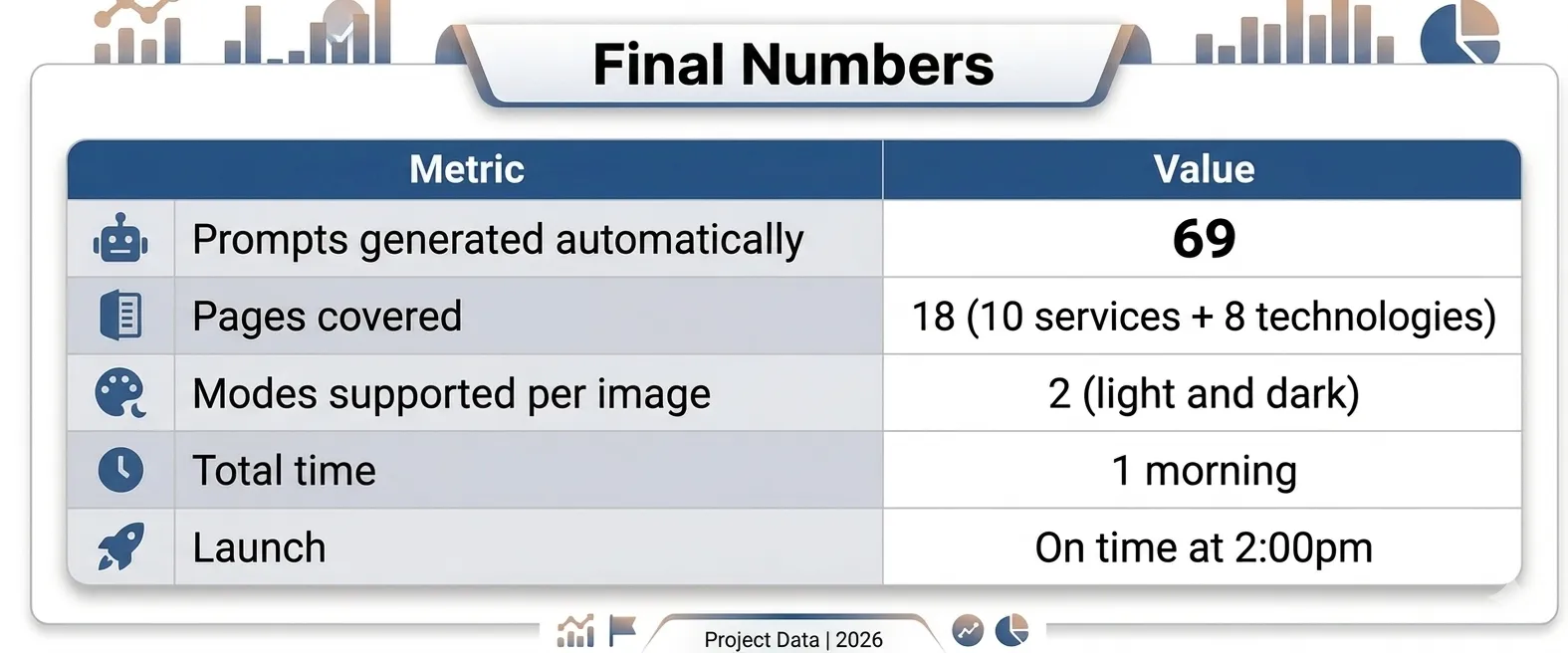
The site had 18 pages across services and technologies. Each service page needed 1 to 2 hero images. Each technology page needed 6 thematic images. Total: 69 unique images, covering everything from our web development and DevOps service pages to the UI/UX design and mobile development sections.
And they couldn't be just any images. Each one had specific requirements:
- Exact dimensions, ranging from 774×464 to 4096×2100 pixels
- Had to work in both light and dark mode
- Had to follow Sancrisoft's color palette: deep navy #1a1f36, soft violet #6366f1
- Had to reflect the actual content and context of each section
- Had to be photorealistic, not illustrations
If I had written each prompt manually, considering the context of each page, its dimensions, colors, and coherence between sections, I wouldn't have made it to 10 a.m. Research on AI-assisted productivity consistently shows that the gains come not from AI doing tasks faster, but from AI eliminating the category of work that doesn't require human judgment. Writing 69 context-specific image briefs is exactly that category. I needed to get out of it entirely.
I needed a different architecture.
The Idea: Let Claude Code Understand the Site
The conventional approach would have been to describe each page manually: "I need an image for the DevOps page. Dark background, pipelines, blue tones." Repeat 68 more times.
The problem is that approach is bottlenecked by me, my memory of each page's content, my consistency in applying the brand guidelines, my energy at prompt number 47.
Instead, I asked a different question: why should I describe the site to Gemini when Claude Code can read the site itself?
I asked Claude Code to use Puppeteer to navigate dev.sancrisoft.com — not just to scrape text, but to genuinely audit the site as a visual system. The specific instructions mattered here, and this is the part that changed everything.
Why Context Was the Key
I didn't ask for basic information. I asked Claude Code to:
- Review each page in both light and dark mode to understand how the design worked across both contexts.
- Extract the color palette and visual style from the live site, not from a brand doc, from the rendered output.
- Read the content of each section (titles, descriptions, subheadings), to understand what each page was actually communicating.
- Generate prompts for photorealistic images that would be visually coherent in both modes.
The key was completeness of context. Not "I need an image for DevOps." But "review how the DevOps page renders, what colors it uses, what the text says, and generate a prompt for a photorealistic image that fits precisely there, in both light and dark mode."
This is the pattern we've documented in our human-in-the-loop development approach: the human architects the process and defines what complete context means. The AI executes with that context. The output quality is a direct function of the quality of the context provided, garbage in, garbage out still applies when the input is a brief, not code.
The Automatic Audit
In minutes, Claude Code had a complete inventory of the site:
- Which pages had 1 hero image and which had 2.
- The exact pixel dimensions of each rendered image slot.
- The dominant colors across light and dark variants.
- The textual content of each section, section by section.
What Claude Code Extracted in Minutes
I didn't have to open the browser inspector 69 times. I didn't have to toggle between light and dark mode for each page. I didn't have to manually note which technology pages had 6 image slots versus which services pages had 2.
Claude Code did that while I had my coffee.
This is what IBM describes as AI agent orchestration, not a single AI doing a single task, but a structured pipeline where one AI's output feeds the next AI's input. The audit output was the brief. The brief was the input for the generation. The human defined the pipeline; the AI executed it.
The result was something I could not have produced manually in the same timeframe at the same quality: a structured, complete, verified inventory of 69 image requirements, each with its precise dimensions, color context, and content brief.
69 Prompts Generated Automatically
With the inventory ready, Claude Code created the folder architecture and generated the prompts in a single pass:
The Folder Architecture
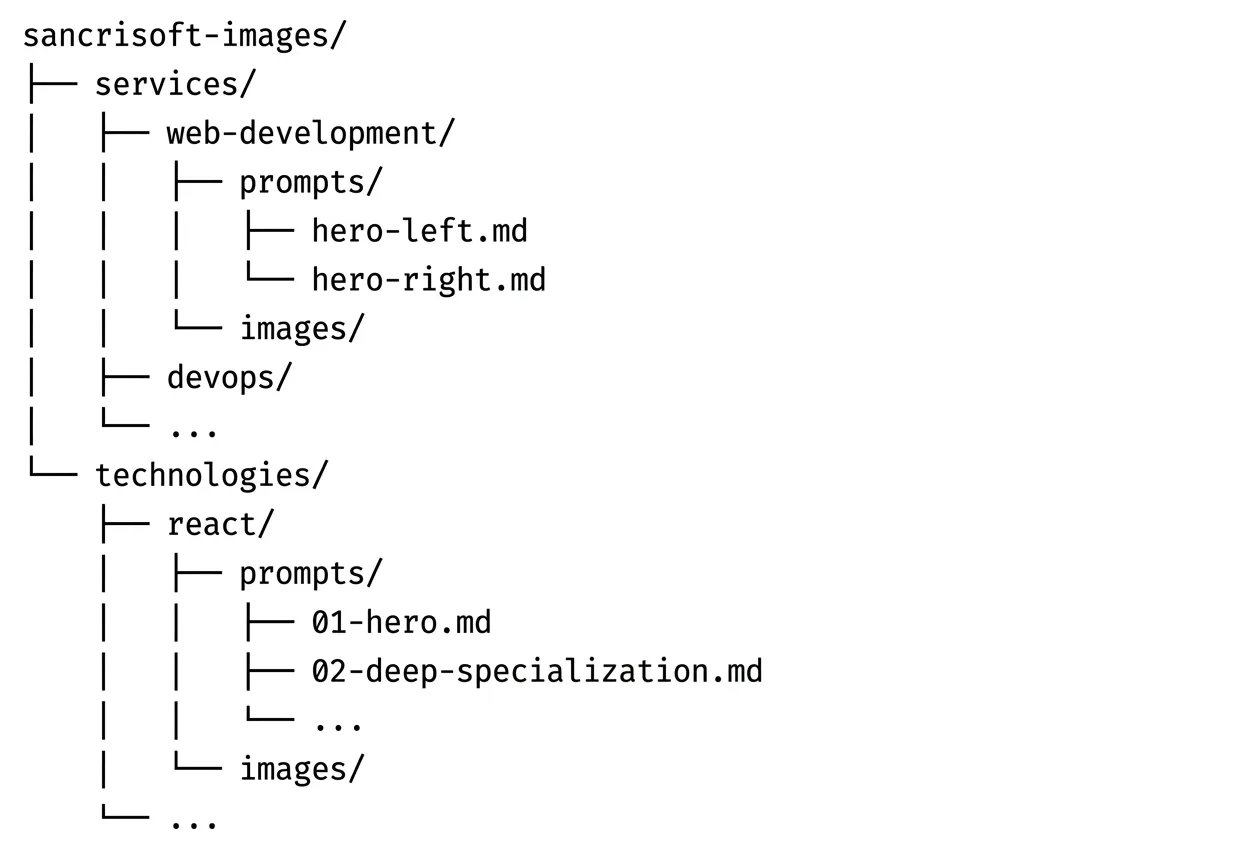
Each folder corresponded to a page. Each prompts/ subfolder contained one markdown file per image slot. Each images/ subfolder would receive the generated output. The structure was the progress tracker, at any moment, I could see exactly what had been generated and what was still pending. Under deadline stress, that visibility was worth as much as the prompts themselves.
Anatomy of a Single Prompt
Each .md file contained a complete, self-sufficient brief. Here is the actual prompt Claude Code generated for the Contentful hero:
''Professional photograph of a content management workflow using Contentful. Content editor and developer collaborating, editor working on Contentful's clean interface while developer integrates content via API. Modern workspace showing the bridge between content creation and technical implementation. Color palette: Contentful blue as accent alongside cool blues and soft violets (#6366f1). The image should work well on both light lavender (#e8e8fd) and dark slate (#0f172a) backgrounds. Style: content and code harmony. High resolution, 16:9 aspect ratio, HD quality 1920x1080px.''
Every prompt had the same base structure: photorealistic scene related to the service or technology, Sancrisoft's color palette with explicit hex codes, instruction to work in both light and dark contexts, and exact pixel dimensions. Claude Code adapted the content semantically: DevOps prompts described pipelines and deployment flows, UI/UX prompts described wireframes and user research, React Native prompts showed mobile devices in context.
The consistency came from the template. The specificity came from the site audit. I didn't write either.
From Prompts to Images: The Gemini Pipeline
With 69 structured prompts in a navigable folder system, the remaining work became mechanical: open Gemini, paste prompt, generate image, save to the corresponding folder.
Copy. Paste. Generate. Save. 69 times.
But this is the key distinction: it was mechanical work, not creative work. I wasn't thinking through each prompt from scratch. I wasn't making decisions about dimensions, colors, or content. I was executing a process that had already been designed. The cognitive load was near zero. The only variable was my pace.
This is the pattern our AI workflow methodology is built on: AI handles the work that doesn't require human judgment, so humans can operate at the level that does. In this case, the judgment calls happened at the architecture stage, how to structure the pipeline, what context to extract, how to define the prompt template. Once those decisions were made, execution was a flow state.
The same logic applies to how our team built a complete marketing site in 48 hours using Claude Code: the architecture decisions front-loaded the cognitive work, and execution followed the structure.
The Result: Launch at 2pm
By 1:30pm, all 69 images were live on the site. At 2pm, we launched.
The images were coherent with the branding. They work in both light and dark mode. They reflect the actual content of each page. And they feel like part of the same visual family across 18 different sections, even though they were generated independently, because they shared the same context and the same prompt architecture.
This matters beyond aesthetics. The site covers a wide range of industries and engagements: from our work scaling a privacy-first AI platform, to modernizing a Telehealth platform for Orbit, to digitizing onboard sales for Celebrity Cruises. Each of those engagements lives on a page that now has images that reflect its actual context, not generic stock photography that could belong to any company in any industry.
For web performance, each image was generated at the exact dimensions the site needed, no scaling, no cropping, no unnecessary image weight slowing down page loads. That was a direct benefit of having Claude Code extract the exact rendered dimensions from the live site before generating anything. The audit informed the output at a level of precision that manual briefing would have missed on at least a third of the images.
The site launched with its own visual identity. Not stock photos that could belong to any tech company in the world.
What This Pattern Means Beyond This Project
The 69-image sprint solved an immediate problem. But the pattern it demonstrated has broader implications for how AI workflows should be designed, and this is the part that matters if your team faces similar scale problems.
The AI-for-AI pattern is underutilized. Most teams use AI tools independently: Copilot for code, Gemini for images, Claude for writing. The leverage is in connecting them, using one AI's structured output as another AI's structured input. Claude Code is exceptional at understanding context and generating structured artifacts. Gemini is exceptional at visual generation. Neither does the other's job as well. Using each for what it does best, with a human-designed pipeline connecting them, is multiplicative, not additive.
Structured output is the interface. The folder architecture with markdown files was not overhead, it was the interface between Claude Code and Gemini. Any pipeline between AI systems needs a structured handoff format. Markdown files, JSON, named folders, the specific format matters less than the consistency. Consistency is what makes execution mechanical instead of cognitive.
Context quality determines output quality. This is the principle behind our AI development manifesto and the reason vague prompts produce vague results. The Contentful prompt worked because it specified the interface being photographed, the collaboration scenario, the exact hex codes, the background variants, and the pixel dimensions. All of that context came from the site audit, not from my memory of what the Contentful page looked like. The AI extracted the context that the AI needed.
Dark mode support is a generation-time decision. Images that work in both light and dark mode cannot be fixed after the fact. They need to be designed for it from the first prompt. By having Claude Code review each page in both modes before generating prompts, every image brief included explicit dark and light background hex codes. The result was images that didn't need post-processing for either context.
What I Learned Orchestrating AIs Under Pressure
- The human is still the architect. Claude Code didn't come up with the idea to review the site in both modes and extract the visual style. That was my decision. The AI executed with exceptional precision, but the vision of how to orchestrate the process came from the human. This is the resolution of the question our human-in-the-loop article poses: AI elevates human judgment by removing the work that doesn't require it.
- Giving complete context changes everything. Generic input produces generic output. A brief that included the live site's rendered colors, the actual section text, and the exact pixel dimensions produced images that felt made for the site, because in a real sense, they were.
- AI for AI is a powerful pattern. Using one AI to prepare the work for another AI multiplies productivity. Each model does what it does best. Claude Code understands context and structure. Gemini generates images. The human designs the pipeline that connects them. This is what AI transformation in software development actually looks like at the production level, not AI doing everything, but AI doing the right things in the right sequence.
- Under pressure, structure saves you. The organized folder with separated prompts made the process navigable under stress. I never had to remember what was done and what was pending. The structure told me. Pipeline design patterns exist for exactly this reason: structure removes cognitive load from execution so judgment can be applied where it actually matters.
Ready to Build Your Own AI Orchestration Workflow?
The 69-image sprint was a specific problem solved with a specific pattern. But the underlying question, how do we make AIs work together under production constraints? is one most engineering teams are starting to face.
The answer isn't which AI to use. It's how to design the pipeline that connects them, what context to extract and pass forward, and where human judgment belongs in the flow. Those are architectural decisions, and they're the ones that determine whether your team gets 5x leverage from AI tools or just marginally faster individual tasks.
At Sancrisoft, our team in Medellín works with these patterns daily, across web development, mobile, healthcare, and product platforms. We've run these workflows under real production pressure, not in sandbox environments. We've documented what works, what fails, and where the human judgment checkpoints have to be.
If your team is facing scale problems that feel like they should be solvable, but the manual approach doesn't fit the timeline, that's exactly the kind of problem we build systems for.
Schedule a consultation with our engineering team. We'll walk through your specific challenge, map where AI orchestration creates leverage, and have an honest conversation about what's actually buildable in your timeline. No pitch, just engineers talking about what's possible.